Last week I took a long hard look at my Facebook fanpage and realised it was way out of line with my blog, work and life vision. It was stale, outdated, boring and in need of a MEGA overhaul! So I sat down with the intention of tweaking a few little things to spruce up the fella however 2 hours later I was still at it; adding apps, changing my timeline photo and updating my 'About' section. Like the true geek I am I thoroughly enjoyed every minute of it but at times I did get a little frustrated with the amount of figuring out and research I had to do on Facebook apps. I simply just couldn't find the perfect recipe on how to add & amend apps so I decided to create this one especially for for you...


6// Click on 'Choose Blogs' and choose your blog that you would like to be linked to your Facebook page.
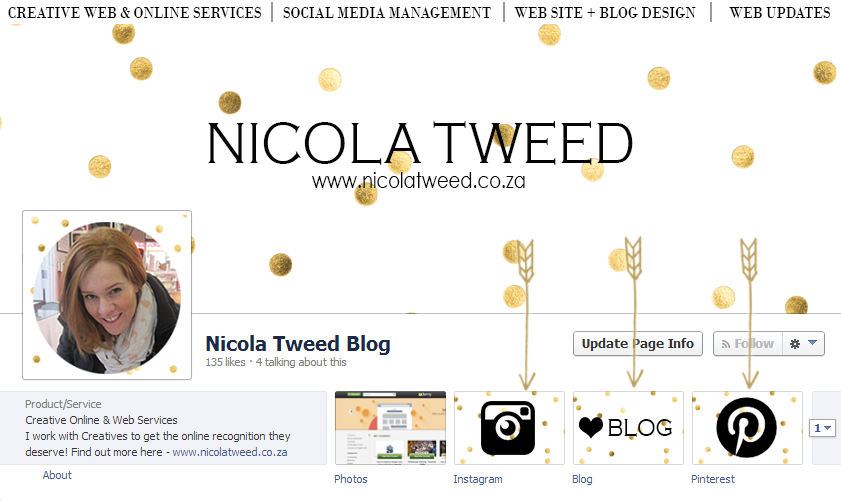
7// And you're all done! 3 apps added to your Facebook fanpage. Yay!
----------------------------------------------------------------------------------------------------------------------
I hope you enjoyed & understood my easy peasy Facebook fanpage app recipe. I'd love to see the updates and amendments you make to your Facebook pages or if you need help updating yours please do email me at .
----------------------------------------------------------------------------------------------------------------------
Social Media Examiner says that 'By customizing your Fan page with apps, you can significantly enhance the user's experience. And, the more you keep your fans engaged and coming back for more, the more likely you'll increase your "viral visibility".' And bonus is because Facebook fanpages are don't cost a thing it's free advertising for your business, blog or service! Yay!
----------------------------------------------------------------------------------------------------------------------
Adding the Instagram app
1// To add the Instagram app to your page you can use either Instatab or the Statigram Facebook app. Either of these will take you to Facebook and ask you which of your Facebook Pages you'd like the application to be installed onto.
2// After you've installed the app you will see it appear under your facebook time line picture
3// Click on the new app you have just installed
4// Then once the next page has loaded click on 'Administrator Panel'. The following box will appear
5// Update your Instagram name & choose your desired view mode and click 'Save Settings'
6// Your done! Easy peasy!
Adding Pinterest
1// To add the Pinterest app to your page you can use Pinterest app. As before this app will take you to Facebook and ask you which of your Facebook Pages you'd like the application to be installed onto. Note: When you are installing apps you have to be in your administrator page not your fan page
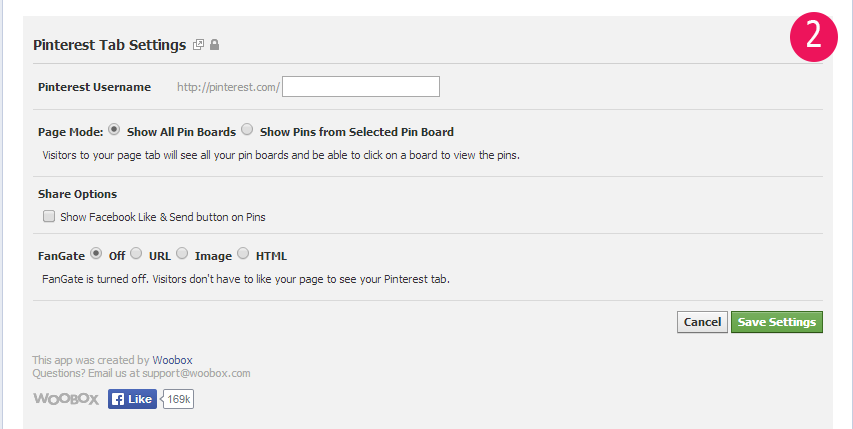
2// Once installed the 'Pinterest Tab Settings' will come up
3// Complete the requested information and click 'Save Settings'
4// And once again you are done!
Adding Your blog app
And lastly how to add your blog to your facebook...most possibly the best & free advertising yet but the most complicated blog app to add to your page.. or at least I thought it was!
*** Firstly before installing the app you need to go to Networked Blogs and create a profile and register your blog.***
*** Firstly before installing the app you need to go to Networked Blogs and create a profile and register your blog.***
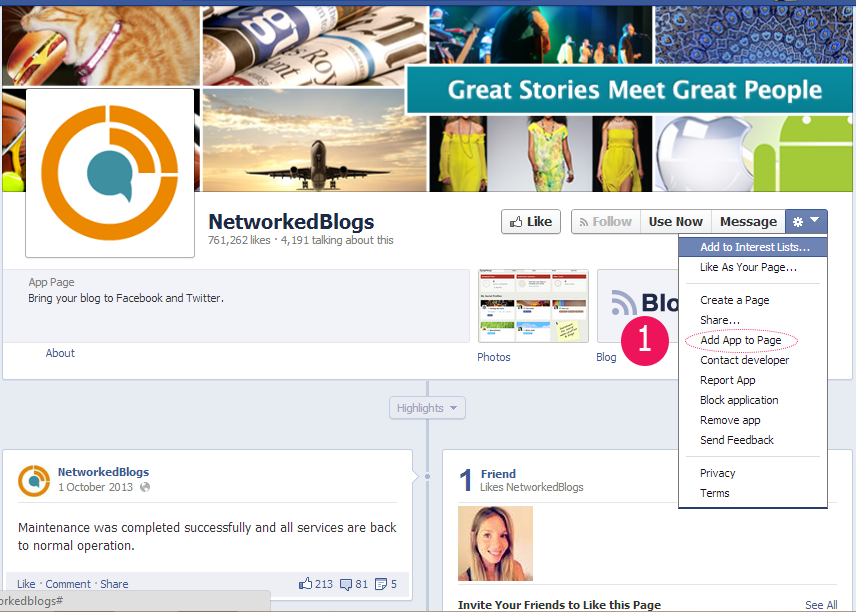
1// Go to the Networked blogs facebook page, click on the drop down arrow and select 'Add app to page'
2// Choose the desired fanpage you would like it added to, once installed you will see the below underneath your timeline.

3// This is the tricky part which took me ages to figure out! Click on the Blog app then when the next page loads copy the URL and change back to being the Administrator. Remember as I said before to add or amend apps you need to be in Administrator mode at all times.
4// Paste the copied URL link into the browser and click enter
5// You will now be on a page that looks like this...

3// This is the tricky part which took me ages to figure out! Click on the Blog app then when the next page loads copy the URL and change back to being the Administrator. Remember as I said before to add or amend apps you need to be in Administrator mode at all times.
4// Paste the copied URL link into the browser and click enter
5// You will now be on a page that looks like this...
6// Click on 'Choose Blogs' and choose your blog that you would like to be linked to your Facebook page.
7// And you're all done! 3 apps added to your Facebook fanpage. Yay!
----------------------------------------------------------------------------------------------------------------------
I hope you enjoyed & understood my easy peasy Facebook fanpage app recipe. I'd love to see the updates and amendments you make to your Facebook pages or if you need help updating yours please do email me at .